Tired of agent hype? Pick by use case.
These are my field notes from ~6 months of advising small & mid-sized startups on coding agent tooling. The question I hear most is: “which coding agent should we standardise on?”
My take (February 2026): start with your primary use case & constraints, not with “today’s best model” lists. In this post, “criteria” means your team & environment (size, maturity, compliance, local-first, provider lock-in, etc.). “Patterns” means recurring fits/misfits I have seen across tools.
My rule of thumb for picking a coding agent is simple:
- Pick your primary use case.
- Pick one tool that fits it.
- Stick with it until you have a strong reason to reassess (new constraints, new state-of-the-art models, compliance, a bigger team, etc.).
If you are currently evaluating five tools at once: stop. Pick one, learn its sharp edges & align the team.
Chasing something new breaks the flow & the flow is your company pulse (I learned this the hard way). Every new thing takes time to master, learn weak & strong qualities & build shared intuition. If you chase new things for the sake of it, it becomes a never-ending saga with little real value. Assess new tools, give engineers time to play with them (they will figure it out), but lock migration decisions on the team level.
I think the most successful outcomes from those consultations surprisingly fell into the Amp & OpenCode buckets most of the time. By “outcomes” I mean engineering productivity, dev happiness & delivery outcomes. For two different reasons:
- Pre-made choices remove a lot of decisions & allow you to move faster. This is the case for Amp.
- Unified multi-model environments & orchestration can improve morale & collaboration. This is where OpenCode shines.
If you forced me to pick quickly, here is my cheat sheet (it will age fast, but the trade-offs will not).
| If your primary goal is… | Pick… |
|---|---|
| Strong defaults, fewer decisions | Amp |
| Flexibility & model management | OpenCode |
| You already chose a provider | OpenAI Codex / Claude Code / Google Gemini |
| Owning the pipeline end-to-end | Pi Coding Agent |
| A GUI with an agentic workflow | Google Antigravity |
A story I keep seeing
I have seen this pattern more than once: a team ends up with an uncontrollable mix of tools & agents — opinionated defaults, different models & no shared AGENTS.md. If you look at the repo history, the symptoms are predictable:
- unnecessary refactors initiated by an “opinionated” but different model
- “smart” notes added to local
AGENTS.mdby the most curious engineer - tooling that does the same thing, but got integrated multiple times by different agents
No tool will fully save you from this. That is fine. You have to unify the engineering culture around agentic coding first: decide how you evaluate tools, what goes into AGENTS.md & what “done” looks like. Once the team aligned & we standardised on Amp, things improved a lot. Documentation started to shape itself (threads, highlights), prompts got simpler & more consistent. Oracle helped flush out duplication & converge on the architecture. Most importantly, engineers started to talk about the workflow, share tips & prompts & collaborate instead of playing in their own sandbox.
Amp: strong defaults, fewer decisions
- I reach for it when I want to avoid the “so many shiny things!” fatigue & just work.
- Very reasonable, always up-to-date selection of models (they make the choices & remove the overhead from the team).
- Some powerful features, like Oracle for a second opinion or Librarian to search remote codebases.
- Very good functionality for collaboration & thread sharing.
- System prompts are simple & effective.
- The pricing is very reasonable.
OpenCode: flexibility & model management
- I reach for it when I need flexibility & model management inside the team.
- Wise approach to configuring Plan/Build/Explore primary agents (different models, handoff).
- Supports the Language Server Protocol (LSP) along the way (kind of good for some cases, but can pollute the context with redundant output, e.g. false-positive diagnostics while the working tree is changing & can lead to additional unnecessary steps when the LSP server cannot keep up with the changes).
- Easy options to try new models, frequent “test-drives” of new models for free.
- Convenient web application & sharing capabilities.
Provider-native tools: OpenAI Codex / Claude Code / Google Gemini
- I reach for these when a team is already vendor-locked (or simply does not want to think about multi-provider setups).
- These tools are solid.
- Codex supports the plan mode now (#10103, #9786).
- Gemini supports Agent Skills & has a nice collection of extensions.
- Claude marketplace is thriving as well & the tool itself is in good shape. Sonnet 5 looks promising.
Pi Coding Agent: owning the pipeline end-to-end
- I reach for Pi when I want full control over models, prompts, settings, tools, policies, and orchestration.
- Pi is a minimal terminal coding harness. This is it.
- Easily extensible, supports almost everything, easy to use & follow.
- Full control over models, prompts, settings, tools & policies — including orchestration.
- Yes, it is in the heart of the famous OpenClaw.
- I think the What I learned building an opinionated & minimal coding agent article from the creator of Pi, Mario Zechner, is a solid overview if you’re curious.
Google Antigravity: a GUI with an agentic workflow
- I reach for it when I want a GUI, but still want to stay agentic.
- This tool is good. I think that in the near future we will migrate from the terminal to UX tools like this, slowly but steadily. While I was writing this, OpenAI introduced the Codex app for macOS — so my point stands. It hides the complexity, built on top of Visual Studio Code & is very transparent with planning, TODOs & walkthrough. It generally works well (note: Gemini 3 is not the strongest option, but Google supports Claude models & even OpenAI GPT-OSS, out of the box).
- Browser subagent is a very good feature.
- It seems that Gemini 3.5 is coming soon.
Models: quick opinions (February 2026)
- GPT-5.2 / GPT-5.2-Codex show the best results in my experience (in any agent). Strong reasoning, reasonable expectations from the thinking mode.
- Claude Sonnet/Haiku/Opus 4.5. Still solid & good to go. If you are all in on Anthropic – do not hesitate. The primary reasons I put OpenAI on top are due to the flexibility (Anthropic is very protective about using their subscriptions with other agents, OpenAI is very open about it). Anyhow, the choice is solid.
- Open models to try (for cost optimisations or if you are looking for self-hosted solutions). I do not treat leaderboards as truth, but they are a decent sanity check:
- Kimi K2.5 – the newest very good model ranked (very) high in benchmarks (rank #5 | Code Arena leaderboard).
- GLM 4.7 – very capable even in big tasks. (rank #7 | Code Arena leaderboard).
- MiniMax M2.1 – fast, reliable & almost perfect to run locally (rank #8 | Code Arena leaderboard).
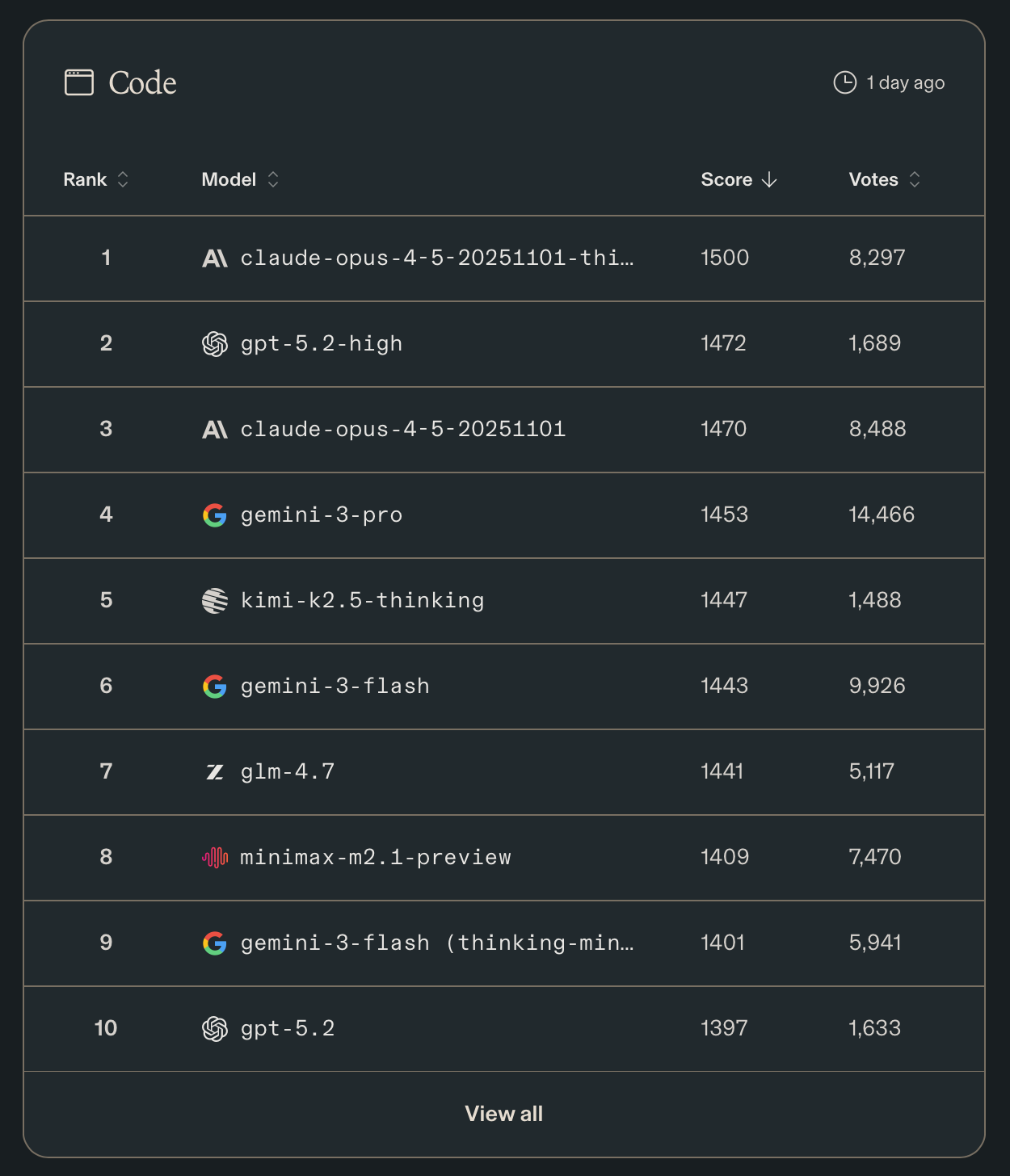
Code Arena “Code” leaderboard screenshot (February 2026). Source: Code Arena leaderboard.
- Bonus, xAI Grok 4.1 Fast (Reasoning) is a very capable model for fast tasks & as a support model (it is very cheap). Give it a try if you have use cases for something simple, but important in your flows.
Things I personally avoid (opinionated)
- Agent Client Protocol (ACP) in the editor of your choice. Magic on top of magic does not scale well (even if it looks convenient), it is better to know the tools you use. I tend to avoid ACP in Visual Studio Code or Zed. At the end of the day, just use the CLI (command-line) version in the embedded terminals (you will lose some fancy features, but you will become more proficient with the solution).
- Default to simple tools over Model Context Protocols (MCPs). Have a use case? Build your own custom prompt or skill. Have something very specific in your flows? Build a simple CLI (command-line) & give the agent instructions. Introduce MCP only when you have stable APIs & repeated workflows that justify the interface overhead. What if you don’t need MCP at all? To build a proper MCP, you need a proper API; if you have a proper API, the agents will be fine without this additional layer.
- Trying every new model that gets hyped on X today. Just do not. Build those boundaries if you have things to do. Allocate one day for experiments, have a clear internal benchmark. But do not rush for every new shiny thing around. If you cannot & it is distracting, go with the Amp; their defaults are very strong.
- Sandboxing. The general state of the union is that sandboxing often feels like theatre (especially for enterprise checklists). Codex is a good example: you can tell the agent to read/change files outside of the working directory with no effort, but it will struggle to commit via
gitbecause the.git/index.lockis not in the worktree. Guardrails are good, but I think this problem has to be solved one level higher: run the agent in a controlled environment (virtualisation is cheap now) instead of trying to convince a free-thinking tool to follow imaginary rules.
What I use (right now)
- I prefer Pi & OpenCode.
- For pure development sessions, Pi is good enough for me. Simple, powerful, easy to customise & (which is important) predictable.
- OpenCode is my go-to tool for planning, investigations & research. Because it manages model selection quite wisely. You can assign specific models for each major mode & specify a “small” model (where I use Grok 4.1 Fast).
- A note about Amp. It is good. Very good. Especially with the Oracle & when you need to investigate a complex problem. But due to the way how they choose & manage models, I cannot use my subscriptions there which is kind of limiting. So, I run it frequently & it shows great results (even within the generous free $10 per day offer).
- About planning mode. Plenty of people say that it is redundant & an unnecessary complication; I agree in general. But it saves time. Instead of writing “Let’s discuss”/“Do not make any changes”/etc. you just switch to a plan mode with one keystroke. So, for me a planning mode is a convenience that I appreciate, not a big feature.
- Models:
- For planning I prefer OpenAI GPT-5.2-high.
- For development tasks – GPT-5.2-Codex-high.
- For small tasks, quick questions – xAI Grok 4.1 Fast (sometimes with Thinking).
Remember: bad tools usually do not survive on the market. You do not like (or like, for that matter) something for two reasons: it solves your use case or you have a strong personal opinion about it. As an example, I do not like Visual Studio Code (it always stays in my way) & prefer Helix which solves my use cases in a great way, but the number of people who installed Catppuccin Theme for VSCode only today is probably higher than the Helix user-base. On the other hand, I think that Safari is the best browser: this is my personal opinion & I will not survive any serious conversation about it, but it does not change the fact that Google Chrome is great. As the saying goes: “Use tools & love people, because the opposite never works”.